Understanding APN Settings
Access Point Name (APN) settings are essential configurations that allow mobile devices to connect to the internet through a service provider’s network. These settings tell the device how to connect to the carrier’s data service, facilitating mobile internet browsing, email access, and other web-based applications. Properly configured APN settings are vital for the smooth operation of mobile data, enabling users to enjoy seamless connectivity.
Each mobile carrier has its specific APN settings, including the APN name, username, password, and different protocol options. When a mobile device is configured with the correct APN, it can successfully access data services, enabling its user to browse the internet, stream video, and download content. Conversely, incorrect APN settings can lead to connectivity issues, preventing the device from accessing essential services or resulting in slow data speeds.
Understanding the terminology associated with APN settings can further help users troubleshoot connectivity problems. Common terms related to APN settings include ‘MMSC’ (Multimedia Messaging Service Center), which is necessary for sending and receiving multimedia messages, and ‘MMS Proxy,’ required for connecting to the multimedia messaging service. Additionally, ‘Authentication Type’ can refer to the method the device uses to authenticate itself to the network, affecting connectivity reliability.
In summary, grasping the concept of APN settings is crucial for any mobile user aiming to ensure optimal data connectivity. Knowing how to access and modify APN settings can empower users to resolve connectivity issues with ease, particularly when switching carriers or changing data plans. By establishing the correct APN settings, users can fully utilize their mobile devices’ capabilities and enjoy uninterrupted access to the internet.
Why APN Settings Matter for Hello Mobile Users
Access Point Name (APN) settings are crucial for mobile users, particularly for those utilizing Hello Mobile services. These settings serve as the gateway for your device to connect to the internet within the network. When configured correctly, APN settings can significantly enhance the overall data experience, ensuring efficient data transmission and optimal internet speed.
For Hello Mobile users, the importance of accurate APN settings cannot be overstated. Incorrect settings can lead to slow internet speeds, connection failures, or a complete inability to access mobile data. This directly affects the user experience, particularly for activities requiring stable data connections, such as streaming videos or video conferencing. Thus, having the right APN settings ensures that users maximize their data plans and utilize Hello Mobile services effectively.
Moreover, APN configurations can influence data reliability. Consistency in network access depends largely on how well the APN settings align with Hello Mobile’s specifications. When users set their APN correctly, they can expect fewer interruptions in service and a more reliable connection. This reliability is especially important for users who rely on their mobile data for work or essential communications.
In summary, the right APN settings serve as the backbone of Hello Mobile’s data service, enhancing both speed and reliability. Users should ensure their APN settings reflect the latest configurations provided by Hello Mobile to enjoy a seamless connectivity experience. By doing so, they can truly take advantage of Hello Mobile’s unlimited data offerings without any hindrances.
Steps to Access APN Settings on Your Device
Accessing the Access Point Name (APN) settings on your device is crucial for configuring mobile data, particularly when using Hello Mobile for unlimited data plans. The steps may vary based on whether you are using an Android or iOS device. Below, we provide a detailed guide for each platform to simplify the process for users.
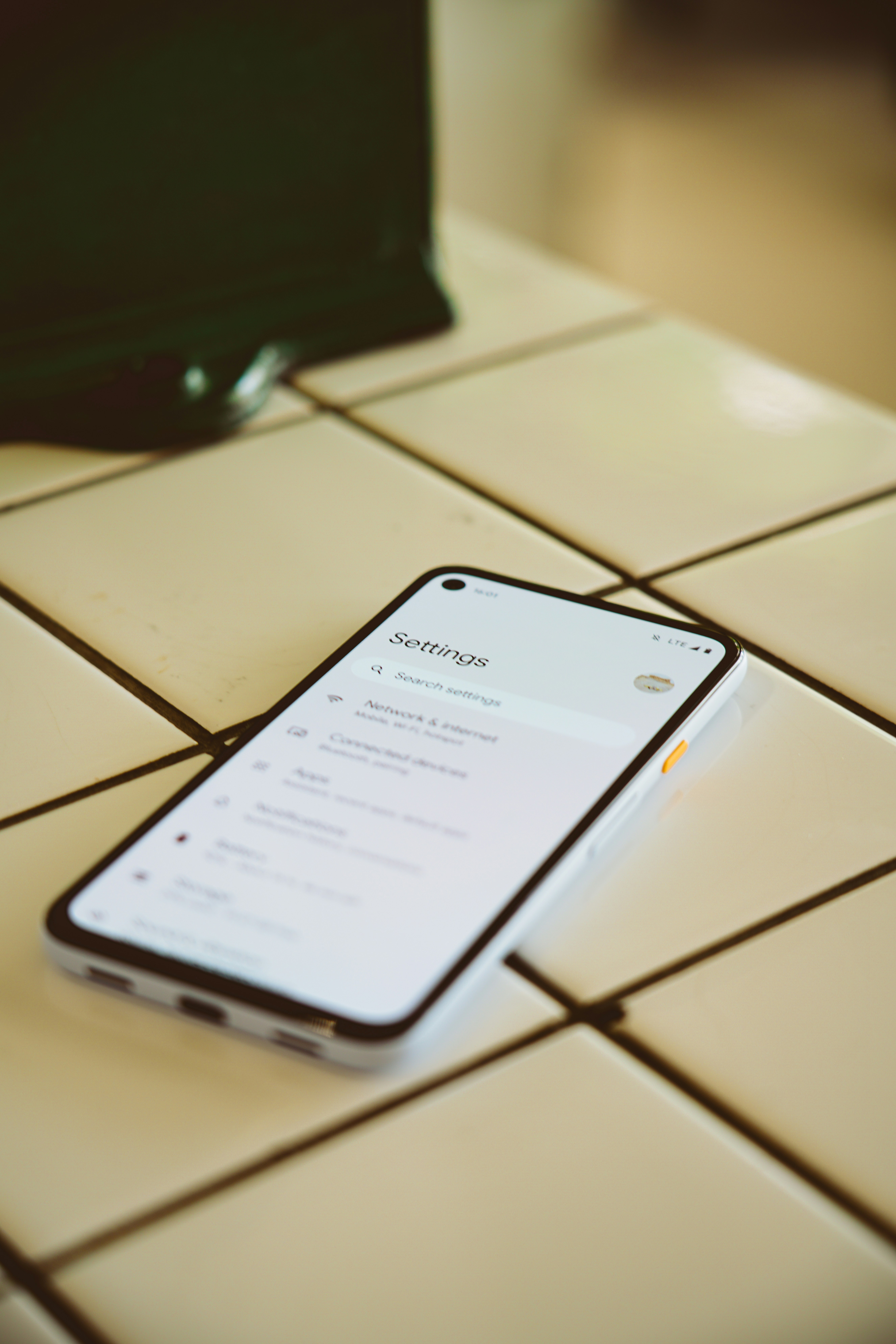
For Android Devices: To access the APN settings on an Android device, begin by opening the “Settings” app from your home screen. Scroll down and tap on “Connections” or “Network & Internet,” depending on your device’s user interface. Within this section, look for “Mobile Networks” and tap on it. Next, select “Access Point Names” or simply “APN.” Here, you will see the existing APN configurations. Tap the ‘+’ icon or “Add” button to create a new APN if required. Fill in the necessary details provided by Hello Mobile for optimal setup.
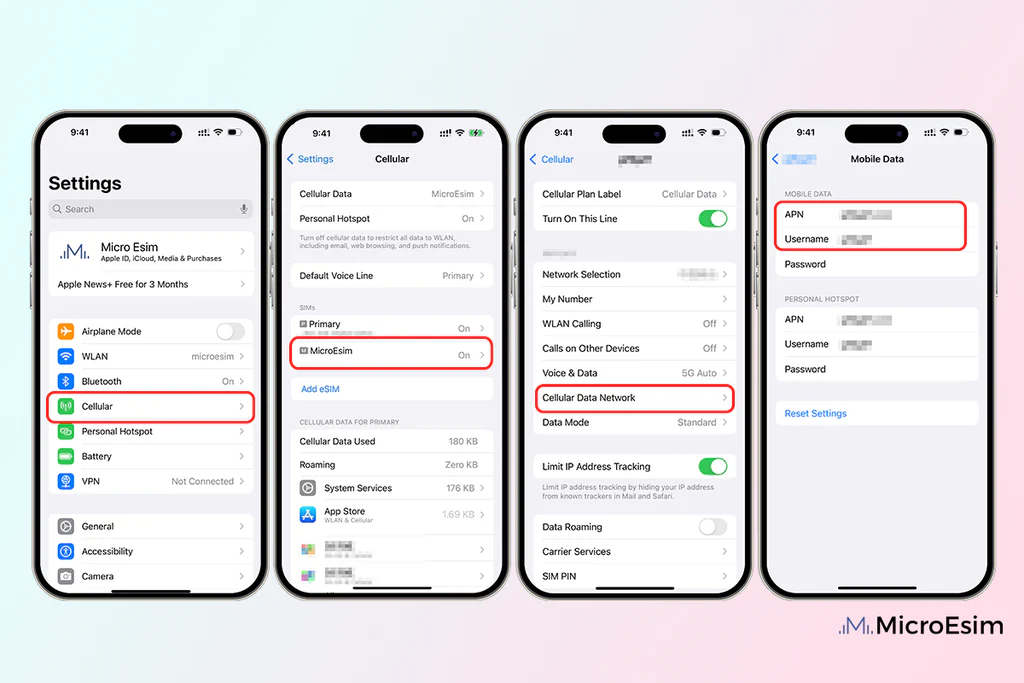
For iOS Devices: For iPhone users, access the APN settings by navigating to the “Settings” app from the home screen. Tap on “Cellular” and then select “Cellular Data Options.” In this section, you will find the option to configure your APN settings. Tap on “Cellular Data Network,” where you can enter the APN details necessary for Hello Mobile. It is important to ensure that all required fields are completed to enable a seamless data connection.
Regardless of the device you possess, it is essential to save the newly entered APN settings if you have made any changes. For optimal performance, restarting your device after making adjustments is advisable to ensure that the changes take effect. By following these straightforward steps, users can successfully access and adjust the APN settings tailored for Hello Mobile, thereby enhancing their unlimited data experience.
Default APN Settings for Hello Mobile
For Hello Mobile users to enjoy seamless access to unlimited data, correctly configuring the Access Point Name (APN) settings is essential. The APN acts as a gateway between the mobile network and the internet, thus ensuring a stable connection. Below are the default APN settings necessary for Hello Mobile users:
APN Name: The APN name for Hello Mobile is usually set as hello. This name needs to be input exactly as specified for the devices to establish the proper connection.
Username and Password: Typically, Hello Mobile does not require a username or password for the APN settings. Users can leave these fields blank unless specified otherwise by customer support or during troubleshooting.
MMSC: The Multimedia Messaging Service Center (MMSC) for Hello Mobile is critical for sending and receiving multimedia messages. The standard MMSC address for Hello Mobile is http://mms.hellomobile.com. This address must be entered correctly to ensure successful MMS functionalities.
MMS Proxy: The MMS proxy serves as a conduit for multimedia messaging, and for Hello Mobile, the typical proxy address is proxy.hellomobile.com, ensuring that all data transmitted adheres to carrier specifications.
MMS Port: Correspondingly, the standard MMS port for Hello Mobile is set to 80 or 8080. This port must be specified to allow the data connections required for multimedia messages.
Ensuring the accuracy of these settings is crucial for achieving the best performance from Hello Mobile’s unlimited data plan. For further assistance or specific device configurations, users can refer to the official Hello Mobile website or customer service.
How to Configure APN Settings for Hello Mobile
Configuring the Access Point Name (APN) settings for Hello Mobile is crucial to ensure smooth internet connectivity on your device. Users looking to utilize Hello Mobile’s unlimited data plan should follow these steps to properly input the necessary settings.
First, begin by accessing the network settings on your device. For Android users, navigate to the “Settings” app, tap on “Network & Internet,” then select “Mobile Network.” Here, you will find an option for “Advanced” or “Access Point Names.” On iOS devices, go to “Settings,” select “Cellular,” and then tap on “Cellular Data Options” followed by “Cellular Network.”
In the APN settings, you will need to input the following configurations for Hello Mobile:
- Name: Hello Mobile
- APN: hello.t-mobile.com
- Username: leave this blank
- Password: leave this blank
- MMSC: http://mms.govna.com/wapenc
- MMS Proxy: 216.155.165.50
- MMS Port: 80
- MNC: 260
- Type: default,mms,supl
Be sure to save these settings, usually by tapping the three dots or options menu and selecting “Save.” If you encounter any issues, a quick reboot of the device can help refresh the connection. In some cases, toggling airplane mode on and off may resolve connectivity problems as well.
If you’re still having trouble accessing the internet after ensuring all settings are correct, double-check that you are in an area with sufficient Hello Mobile network coverage. Also, verify that there are no service disruptions in your area by visiting Hello Mobile’s official website or contacting customer support.
Troubleshooting Common APN Issues
For Hello Mobile users, issues related to APN settings can often lead to frustrating connectivity problems. Identifying and resolving these issues is essential for ensuring a seamless mobile data experience. Below, we will explore some of the most common APN issues encountered by users and the strategies to address them effectively.
One common issue is incorrect APN configuration. This can result in failure to access mobile data services. To resolve this, double-check that the APN settings are correct. Ensure that the APN name, username, password, MMSC, and MCC are entered accurately according to the specifications provided by Hello Mobile. A small typo can disrupt connectivity, so it is advisable to compare your entries with official resources.
Another potential problem is network selection. Sometimes, devices default to a network that isn’t supported for data services. Users should navigate to their network settings and select the appropriate carrier or set it to automatic. Additionally, toggling the mobile data setting on and off can refresh the connection, which may resolve underlying issues.
Additionally, software updates can influence APN functionality. Keeping your device’s operating system up to date can minimize compatibility issues related to APN settings. It’s also beneficial to restart your smartphone after making changes to the APN configuration, which can help solidify the new settings.
If problems persist, users might want to try resetting network settings entirely. This step removes any saved Wi-Fi passwords and previously configured APNs, allowing users to start from a clean slate. After the reset, they can input the APN settings for Hello Mobile again.
Lastly, consult the Hello Mobile support page for any ongoing issues or updates that may affect connectivity. Accessing FAQs and community forums can provide additional insights into specific APN troubles and user experiences, further aiding in troubleshooting.
Testing Your Connection After Modifying APN Settings
After editing your Access Point Name (APN) settings for Hello Mobile, it is essential to test your internet connection to confirm that the changes are effective and functioning properly. Testing your connectivity can be done through a few simple steps that will ensure your device is connected to the internet correctly.
First, restart your device to guarantee that the new settings are applied effectively. Once the device has rebooted, check the signal indicators to ensure you are connected to a network. Look for the mobile data icon, usually displayed at the top of your screen, indicating that cellular data is enabled.
The next step is to perform a basic connectivity test. Open a web browser or any app that relies on the internet and try to access a well-known website or service. If the website loads quickly and without interruption, your APN settings are correctly configured. Alternatively, if you encounter timeouts or error messages, further modification may be needed.
To gain a deeper understanding of your internet performance, you can also conduct a speed test. There are several free tools available online, such as Ookla’s Speedtest or Fast.com, which allow you to measure your download and upload speeds. These tests provide valuable insights into your connection’s performance, helping you assess if your adjustments are yielding the expected results. Remember that a stable connection should deliver speeds close to those advertised by your service provider. If the speeds are significantly lower, you may need to revisit your APN details.
Overall, thorough testing is vital when modifying APN settings to ensure optimal internet connectivity. This process not only aids in confirming that your adjustments were successful but also enhances your overall mobile internet experience.
Maintaining Your APN Settings
To ensure optimal connectivity and performance while using Hello Mobile, it is crucial to periodically review and maintain your Access Point Name (APN) settings. These settings enable your device to connect to the internet and access services provided by your mobile network. As technology evolves and your device updates, the network parameters may also change, making regular maintenance of your APN settings significant.
One effective approach to maintaining your APN settings is to check for any updates from Hello Mobile. This can typically be done by visiting the official Hello Mobile website or contacting customer support. Network operators occasionally release new configurations that can enhance service performance, boost security, and eliminate connection issues. Staying informed of such updates allows you to efficiently adjust your APN settings to align with the latest requirements.
Additionally, it is advisable to monitor any software updates on your device. Updates may inadvertently change settings or introduce new features that could affect how your device interacts with network services. Regularly reviewing your settings after a device update can help in detecting any discrepancies that might impair connectivity. This is particularly relevant for smartphone users who may encounter settings altered with new operating system versions.
It is also beneficial to keep a record of your APN settings. Documenting the correct values helps in quickly reverting back to the proper configuration if any changes lead to connectivity issues. More importantly, if you experience frequent network interruptions, revisiting and verifying your APN settings becomes essential to troubleshooting the problem.
In light of these factors, diligence in maintaining your APN settings is key to enjoying uninterrupted unlimited data service with Hello Mobile. Regular reviews and prompt updates can significantly enhance your overall mobile experience.
Conclusion and Further Resources
In conclusion, having the correct Access Point Name (APN) settings is crucial for Hello Mobile users to enjoy uninterrupted unlimited data services. Proper configuration not only ensures efficient network connectivity but also enhances the overall user experience by enabling seamless internet access. Users must take the time to verify their APN settings to avoid common connectivity issues. The right settings can vastly improve performance; hence it is recommended to follow the guidelines shared in this blog post.
For those who may encounter issues or require further assistance, several resources are available. The Hello Mobile official website regularly updates the recommended APN settings, which users should refer to in case of discrepancies. Additionally, users can consult the Hello Mobile customer service team for personalized support, should they face challenges in configuration.
Online forums and community discussions dedicated to mobile users can also serve as a valuable source of troubleshooting tips and advice based on real-life experiences. These platforms often provide insights into common issues faced by users and solutions derived from collective knowledge. By participating in such discussions, Hello Mobile subscribers can stay informed about best practices and the latest developments regarding APN settings.
Regularly reviewing the resources mentioned in this post can help users maintain optimal settings for a smooth and reliable data experience. Staying informed ensures that Hello Mobile users can maximize their unlimited data capabilities, thereby making the most out of their mobile service.