Understanding APN Settings
Access Point Name (APN) settings are critical configurations that enable mobile devices to connect to the internet and access various services offered by mobile carriers. These settings serve as a gateway to the carrier’s network, allowing users to browse the internet, send multimedia messages (MMS), and utilize other data services. Correct APN settings are essential for ensuring a seamless online experience, particularly when traveling internationally.
The importance of APN settings becomes particularly evident when considering international roaming capabilities. When users travel abroad, their devices must communicate effectively with local networks to maintain data connectivity. Incorrect APN settings can lead to significant challenges, including an inability to connect to the internet, problems sending and receiving messages, or even incurring unexpected roaming charges. Additionally, the settings required for data access when traveling may differ from those used in the home country, emphasizing the need for accurate configurations.
Understanding the components of APN settings is crucial. Each APN setting typically includes fields such as the APN name, username, password, and various authentication types. Mobile operators provide these parameters, which may vary between carriers and countries. Consequently, it is imperative for users to verify and update their APN settings to ensure compatibility with the local network when roaming internationally.
Inadequate knowledge regarding APN settings can result in a frustrating experience for users who rely on their mobile devices while traveling. Therefore, familiarizing oneself with APN settings is beneficial for any traveler wishing to maintain connectivity and utilize their mobile services efficiently on an international scale.
Why Configuring APN Settings is Important for International Roaming
When traveling internationally, one crucial aspect to consider is the configuration of Access Point Name (APN) settings. These settings are essential for enabling mobile data services, allowing users to access the internet, send multimedia messages, and make use of various apps while abroad. Without properly configured APN settings, users may encounter significant connectivity issues that can hinder their ability to communicate and stay connected.
International roaming often involves different mobile networks and data agreements, which can lead to varying requirements for APN configurations. When a traveler crosses borders, the home network’s settings may not be automatically compatible with the local networks. This disparity can result in a lack of mobile internet access, increased data charges, or misleading error messages when attempting to connect to services.
Furthermore, users who do not configure their APN settings correctly may find that they can only make voice calls or send SMS messages, without the benefits of data-driven services. This limited functionality can greatly diminish the utility of mobile devices while traveling, particularly when relying on data for navigation, social media, or other critical applications. Additionally, specific services may require particular APN configurations that differ even between carriers in the same country, making it imperative for travelers to be prepared and knowledgeable on configuring these settings before embarking on their journey.
In conclusion, understanding the importance of configuring APN settings for international roaming is vital for ensuring seamless mobile connectivity. Proper configuration not only facilitates internet access but also allows users to make the most of their devices while exploring new destinations, enhancing their overall travel experience.
Checking Your Current APN Settings
Configuring the Access Point Name (APN) settings is crucial for ensuring smooth international roaming. Before making any adjustments, it is essential to check your current APN settings on your device. This step not only establishes a reference point but also helps in troubleshooting potential connectivity issues that may arise when traveling abroad.
To check the APN settings on Android devices, navigate to the “Settings” app. From there, select “Network & internet,” followed by “Mobile network” and then “Advanced.”You will find the option labeled “Access Point Names.” Tap on this to view the existing APN settings. It is advisable to take note of your current configuration, including the APN name, username, password, and other relevant fields. This information is beneficial if you need to revert to the original settings after making changes.
If you are using an iOS device, checking your APN settings involves a slightly different process. Open the “Settings” app and select “Cellular,” then proceed to tap on “Cellular Data Options.” Here, you may find an option for “Cellular Network” where you can view your APN settings. Like with Android, documenting this information beforehand can prevent any data connection issues once you reconfigure your APN for international roaming.
Many mobile service providers offer online resources or documentation that detail standard APN settings for their networks. It is worthwhile to check if your carrier has specific guidelines. Having your device’s current APN settings readily available also ensures a smoother transition to new configurations necessary for international data access.
How to Obtain the Correct APN Settings for International Roaming
To enable seamless connectivity while traveling abroad, obtaining the correct Access Point Name (APN) settings from your mobile network provider is crucial. The APN acts as a gateway between your mobile network and the internet, allowing your device to access various online services. Here, we will cover the essential steps to find and configure these settings effectively.
First, it is recommended to contact your mobile service provider directly. Most carriers have dedicated support teams available to assist with international roaming inquiries. By reaching out to them via phone, email, or online chat, you can request the specific APN settings required for your upcoming travels. Make sure to inquire about any additional roaming agreements for the countries you plan to visit, as this may affect your mobile data service and billing.
In addition to direct contact, many providers also offer this information on their official websites. Look for a designated section on international roaming or APN settings. These resources frequently include detailed instructions tailored for different device types, thus ensuring you have the right configuration regardless of your smartphone model. Check for any specific codes or fields that might need to be populated within your device’s settings.
Moreover, consider engaging with online forums or communities where users share insights about various providers’ APN configurations. Websites dedicated to mobile technology might also have aggregated lists of APN settings categorized by provider and country, which can serve as an invaluable starting point.
By gathering accurate APN settings from your provider and ensuring proper configuration, you will be well-equipped to utilize your mobile device effectively for data services while roaming internationally.
Steps to Configure APN Settings on Android Devices
Configuring the Access Point Name (APN) settings on your Android device is essential for ensuring optimal connectivity during international roaming. The steps may vary slightly depending on the device manufacturer and Android version; however, the fundamental process remains similar across most devices.
Begin by opening the “Settings” app on your Android device. This can typically be found in your app drawer or on your home screen. Once inside the settings menu, scroll down and tap on “Network & Internet” or “Connections,” depending on your device. From here, look for “Mobile Network” or “Cellular Network.”
After accessing the mobile network settings, search for “Advanced” or “Access Point Names” (APN). Selecting the APN option will display a list of available APNs. Here, it is essential to confirm whether your current APN settings are appropriate for international roaming. If you do not see an entry suitable for roaming or you need to create a new one, tap on the ‘+’ icon to add a new APN.
In the new APN settings screen, you will be required to input several details, which may include the APN name, username, password, and server settings provided by your mobile service provider. It is crucial to refer to your carrier’s guidelines to ensure accuracy. After entering the necessary information, save the settings by tapping the three dots (or options menu) at the top right corner and selecting “Save.”
Once saved, you may need to select the newly created APN as your active APN. This can be done by tapping on the newly saved APN from the list. For most devices, ensuring the selected APN has a green dot or is highlighted indicates it is active. After this process is complete, restart your device to ensure the changes take effect. Doing so will generally facilitate connectivity for data services while roaming internationally.
Steps to Configure APN Settings on iOS Devices
Configuring the Access Point Name (APN) settings on iOS devices, such as iPhones and iPads, is a critical step for users who wish to utilize international roaming services effectively. The process may differ slightly from Android devices, but it remains relatively straightforward. Follow the below steps carefully to ensure proper configuration.
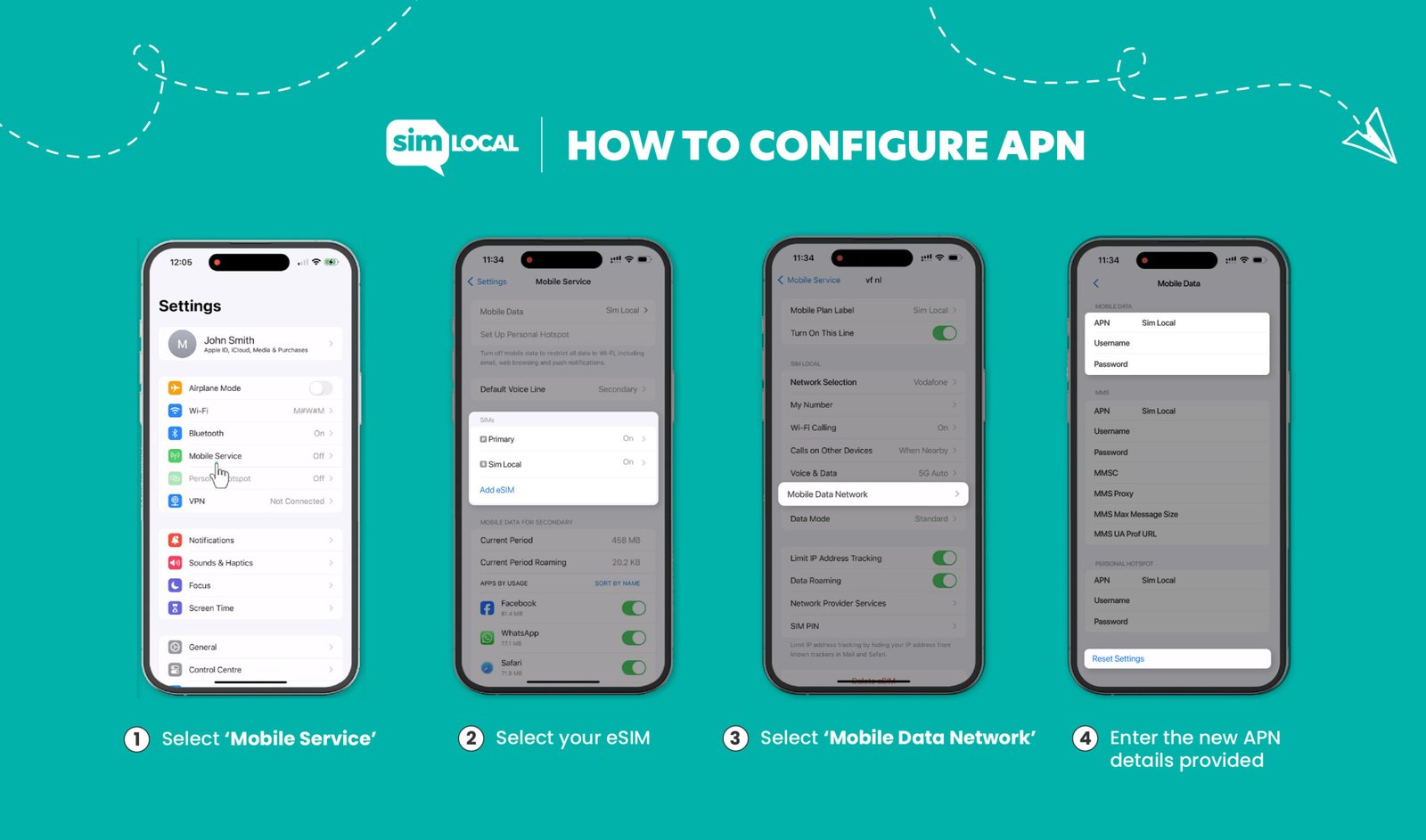
First, begin by opening the Settings app on your iOS device. You will find this app on your home screen represented by a gear icon. Once inside the Settings menu, scroll down and select the option labeled Cellular or Mobile Data, depending on your device.
In the Cellular settings, you will see a choice for Cellular Data Options. Tap this option, and then select Cellular Network or Mobile Data Network. This section is where you will input the necessary APN settings provided by your mobile carrier. It is important to have the correct APN information, which may vary by carrier.
Upon reaching the APN settings, enter the required details as provided by your carrier into the respective fields. Common fields to fill include APN, Username, Password, and any additional settings such as MMSC or MMS Proxy if applicable. Make sure that you do not use any spaces in these fields. After entering the information, double-check for accuracy.
Finally, once you have verified that all information is inputted correctly, return to the previous settings menu and ensure that the toggle for Cellular Data is turned on. This action activates your data services, allowing you to access the internet and utilize various applications while roaming internationally. By following these instructions, users can ensure their iOS devices are well-configured for international roaming through proper APN settings.
Troubleshooting Common Issues with APN Settings
When configuring Access Point Name (APN) settings for international roaming, users may encounter a variety of issues that hinder connectivity. Understanding how to troubleshoot these problems is essential for uninterrupted service and ease of communication while traveling abroad.
One of the most common issues is receiving error messages when attempting to connect to the network. This often occurs due to incorrect APN settings. To resolve this, users should double-check their APN configurations against the recommended settings provided by their mobile carrier. Ensure that the APN name, username, password, and authentication type are entered precisely, as even minor discrepancies can lead to connectivity problems.
Another potential issue is the inability to access the internet or send multimedia messages (MMS). This could stem from a lack of mobile data activation. It’s crucial to verify that mobile data is enabled on the device. Additionally, users can toggle airplane mode on and off to reset the network connection. If these steps do not resolve the issue, restarting the device may help restore connectivity.
In cases where the device remains unable to connect, users should also consider checking for software updates. Outdated software can cause compatibility issues with network settings. Updating the device to the latest operating system version can resolve many underlying issues.
If all else fails, contacting the mobile carrier’s customer support is a prudent step. They can provide assistance tailored to the specific problem encountered and, if necessary, walk users through the configuration process again. By addressing these common issues methodically, users can enjoy seamless connectivity during their international travels.
Best Practices for Managing APN Settings While Traveling
When traveling internationally, ensuring seamless connectivity is a primary concern for many travelers. One essential aspect of maintaining mobile data services is the proper configuration of Access Point Name (APN) settings. To ensure a smooth experience, there are several best practices travelers should consider while managing their APN settings.
Firstly, it is advisable to check and configure your APN settings before departing for your trip. This preemptive step allows you to avoid connectivity issues upon arrival. Most mobile service providers offer specific APN configurations for international roaming, and it is crucial to obtain these details prior to your travels. You can generally find this information on your provider’s official website or by contacting their customer support.
During your travels, regularly monitor your data usage to anticipate potential costs. International roaming can incur substantial charges, and understanding your data consumption will help you avoid unexpected bills. It may be prudent to switch to Wi-Fi whenever possible, especially for data-intensive activities such as video streaming and app downloads. This can minimize reliance on mobile data and curb potential roaming fees.
If you find that your data service does not function as expected while roaming, the first step is to revisit your APN settings. Ensure that the APN configuration aligns with the guidelines provided by your mobile carrier. If issues persist, switching your device to airplane mode for a few moments and then reconnecting may prompt your device to refresh its network settings. In some cases, you may need to manually select a local network operator compatible with your plan.
Ultimately, staying informed about your mobile provider’s policies and available resources can significantly enhance your international travel experience. By adhering to these best practices, you can effectively manage your APN settings and enjoy uninterrupted connectivity while overseas.
Conclusion and Final Thoughts
In summary, configuring the Access Point Name (APN) settings correctly is crucial for ensuring seamless international roaming experiences. A well-set APN allows mobile users to connect to the internet, send and receive multimedia messages, and access various online services without disruptions when traveling abroad. Incorrect APN settings can lead to difficulties in connectivity, data overages, and unexpected charges, which is why it is essential for users to verify and update these settings before departing for international destinations.
Staying informed about the specific APN configurations required by different carriers worldwide can significantly enhance your roaming experience. Many users may overlook this vital step, assuming that their mobile devices will automatically adjust settings. However, due to various network compatibility issues, manual adjustments are often necessary. By understanding how to access and modify these settings, users can enjoy their travels without the stress of connectivity issues.
Moreover, it is recommended to periodically check for updates from mobile service providers regarding any changes to APN configurations, particularly when traveling to new countries or regions. This proactive approach not only mitigates potential roaming problems but also ensures that users can benefit from the latest available services during their travels.
In conclusion, diligently setting and verifying your APN settings prior to international roaming can lead to a more enjoyable and hassle-free experience abroad. By giving attention to these technical details, mobile users can navigate their journey confidently, keeping themselves connected and informed without incurring unwanted costs.